Camera Nodes
All camera nodes share a set of common attributes. These are listed below.
| Name | Type | Default |
|---|---|---|
screens | <connection> |
This connection accepts screen nodes which will rasterize an image of the scene as seen by the camera. Refer to defining output drivers and layers for more information.
| Name | Type | Default |
|---|---|---|
shutterrange | double |
Time interval during which the camera shutter is at least partially open. It’s defined by a list of exactly two values:
- Time at which the shutter starts opening.
- Time at which the shutter finishes closing.
| Name | Type | Default |
|---|---|---|
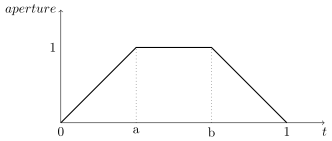
shutteropening | double |
A normalized time interval indicating the time at which the shutter is fully open (a) and the time at which the shutter starts to close (b). These two values define the top part of a trapezoid filter. The end goal of this feature it to simulate a mechanical shutter on which open and close movements are not instantaneous.
| Name | Type | Default |
|---|---|---|
clippingrange | double |
Distance of the near and far clipping planes from the camera. It’s defined by a list of exactly two values:
- Distance to the
nearclipping plane, in front of which scene objects are clipped. - Distance to the
farclipping plane, behind which scene objects are clipped.